
YOLO11 Object Detection - Batch + Singularity
Description
Object Detection
What it is
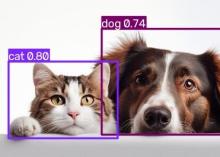
A ready-to-run container that finds everyday objects in a photograph. You give it an image; it gives you back the same image with boxes drawn around what it found, plus a machine-readable list of those objects, how confident it was about each one, and where in the picture they are.
It uses a general-purpose model trained to recognize eighty common categories — people, vehicles, animals, furniture, food, everyday household items. It cannot find things outside that list, so a picture with none of them in it correctly comes back empty.
This is the batch version: it runs once, does its work, and exits. There is nothing to click and nothing to watch. That makes it the right choice when you have a folder of images rather than a single interesting one.
Use cases
- - Running detection across a large image set on a cluster, one job per batch.
- - A step inside a larger pipeline, where the object list feeds whatever comes next.
- - Teaching what a containerised analysis job looks like end to end, without the distraction of a user interface.
- - Producing a consistent, reproducible baseline that other tools can be compared against — the model and its version are fixed inside the container, so the same image gives the same answer next year.
What’s included
- - The detection program itself.
- - The trained model, built into the container. Nothing is downloaded when you run it, which means it works on machines with no internet access at all.
- - Everything the program depends on, at fixed versions.
For each image you get an annotated picture and a structured results file.
Where it runs
- SDSC Expanse, on a compute node via the Singularity container runtime. Requires a valid ACCESS allocation on Expanse.
Getting started
Choose your image in the app submission form. Configure your Expanse resource request. Once scheduled, Singularity will run and output will be placed into your output.
Results are written alongside the input, so a whole folder can be worked through the same way.
Reference
The Singularity/Apptainer sif is created from files hosted in https://github.com/OneSciencePlace/app-object-detection
That repository’s README has the exact commands for both Docker and Apptainer, along with the handful of options — most usefully the confidence threshold, which controls how sure the model has to be before it reports something.
If you would rather explore interactively before committing to a batch run, two companion apps do exactly that: one presents the same analysis as a notebook, the other as a desktop with a file browser.
Links