
YOLO11 Object Detection - Desktop + Docker
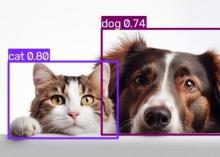
Description
Object Detection — Desktop
What it is
A small Linux desktop in your browser, set up for object detection. It gives you a terminal with a single command for running the detector, and a file
browser for looking at the results.
You put an image in your working folder, type one short command, and the annotated version appears alongside it. In the file browser the two sit side by side as thumbnails, so the difference is visible before you open either one. Open either and you can flip between the original and the annotated version at the same size — which is the comparison that actually tells you something.
Use cases
- Looking closely at detection results, one image at a time, when a list of numbers is not enough and you want to see what the model saw.
- Trying out sensitivity settings on real images before running a large batch.
- Demonstrations and workshops, where a visible desktop is easier to follow than a command line and nobody has to install anything.
- Working on a cluster where your images live, without copying them back to your own machine to look at them.
What's included
- A desktop with a file browser, an image viewer, a text editor and a terminal.
- A single command for running detection, with a shortcut that opens the result as soon as it is ready.
- Desktop icons for each of these, including one that opens a terminal already showing you what to type.
- The trained model, built in. Nothing is downloaded when you run it, so it works with no internet access.
- A short guide, placed in your home folder the first time you start a session.
Results are written next to your images in the same form the batch app produces, so a setting you work out here can be handed straight to a large run.
Where it runs
- On the AWS system, through Docker.
Getting started
Start the session from the folder holding your images and open the private link it gives you. A file browser and a terminal are already open on that folder.
Type the detection command with the name of an image; results appear beside it. The guide in your home folder has the short version of everything else.
Reference
The Docker image is created from files hosted in https://github.com/OneSciencePlace/app-object-detection-novnc
That repository’s README has the exact commands for both Docker and Apptainer, along with the handful of options — most usefully the confidence threshold, which controls how sure the model has to be before it reports something.
If you would rather explore interactively before committing to a batch run, two companion apps do exactly that: one presents the same analysis as a notebook, the other as a desktop with a file browser.