
YOLO11 Object Detection - Jupyter + Singularity
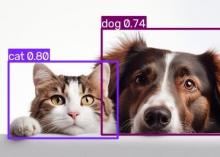
Description
Object Detection — Notebook
What it is
An interactive tutorial for object detection, delivered as a notebook that opens in your browser. It walks through finding objects in a photograph one step at a time: load an image, run the model, look at what came back, and see how the results change as you adjust the sensitivity.
It is the teaching companion to the batch object detection app. Both use the same model and produce the same results; this one lets you watch it happen and change your mind halfway through.
The notebook is already open when the session starts, and it is yours to edit — change a line, re-run a cell, take it apart to see what each piece does.
Use cases
- Learning what object detection actually does, and what its settings mean, by moving them and watching the effect.
- Choosing a confidence threshold for a real dataset: try values here on a few representative images, then use the one you settled on for a full batch run.
- Teaching and workshops. Everyone gets an identical environment, opens the same notebook, and nobody installs anything.
- Inspecting a handful of images closely before committing to processing thousands.
What's included
- The tutorial notebook, which explains each step as it performs it.
- A slider that re-runs the detection at different sensitivities, so you can see directly what a stricter or looser setting keeps and discards.
- The trained model, built in. Nothing is downloaded when you run it, so it works on machines with no internet access.
- A full notebook workspace, so you can bring your own images and write your own cells alongside the tutorial.
Results are written next to your images in the same form the batch app produces, so anything downstream cannot tell which one made them.
Where it runs
SDSC Expanse, on a compute node via the Singularity container runtime. Requires a valid ACCESS allocation on Expanse.
Getting started
Upload an image when launching the job, or you can upload an image from inside the notebook if you did not bring one.
The Singularity/Apptainer sif is created from files hosted in https://github.com/OneSciencePlace/app-object-detection-jupyter
That repository’s README has the exact commands for both Docker and Apptainer.
If you would rather run the python object detection script directly or via a desktop environment, two companion apps do exactly that: one runs the script directly as a batch job, the other as a desktop with a file browser.
Links